Showing posts with label Openstack. Show all posts
Showing posts with label Openstack. Show all posts
Friday, February 13, 2015
OpenStack : Manually installing and configuring Red Hat Enterprise Linux OpenStack Platform
https://access.redhat.com/documentation/en-US/Red_Hat_Enterprise_Linux_OpenStack_Platform/5/html/Installation_and_Configuration_Guide/index.html

Saturday, August 23, 2014
OpenStack : Neutron : Neutron problem and solution
Problem :
in /var/log/neutron/openvswitch-agent.log
2014-08-23 14:46:58.105 4456 TRACE neutron.plugins.openvswitch.agent.ovs_neutron_agent Timeout: Timeout while waiting on RPC response - topic: "q-plugin", RPC method: "security_group_rules_for_devices" info: "<unknown>"
[openstack@novo ~(keystone_admin)]$ neutron port-list
Connection to neutron failed: Maximum attempts reached
Solution :
[root@novo sbin]# service neutron-server restart
Stopping neutron: [FAILED]
Starting neutron: [ OK ]
After that :
in /var/log/neutron/openvswitch-agent.log
2014-08-23 14:47:00.384 4456 INFO neutron.plugins.openvswitch.agent.ovs_neutron_agent [req-45eca3db-5fa3-45da-b439-526819e7a010 None] Configuration for device 24110dfe-84f9-4dca-beb0-e17cf50b291f completed.
[openstack@novo ~(keystone_admin)]$ neutron port-list
+--------------------------------------+------+-------------------+-------------------------------------------------------------------------------------+
| id | name | mac_address | fixed_ips |
+--------------------------------------+------+-------------------+-------------------------------------------------------------------------------------+
| 24110dfe-84f9-4dca-beb0-e17cf50b291f | | fa:16:3e:b4:df:f0 | {"subnet_id": "4de1afb9-ed1f-4c32-9bbb-20eec6073963", "ip_address": "10.0.0.2"} |
| 36b6c681-4032-495e-a799-ab05a4d35249 | | fa:16:3e:29:ed:8c | {"subnet_id": "4de1afb9-ed1f-4c32-9bbb-20eec6073963", "ip_address": "10.0.0.3"} |
| 426f579f-5506-4229-99ff-6840e4b38dea | | fa:16:3e:a4:b2:07 | {"subnet_id": "4de1afb9-ed1f-4c32-9bbb-20eec6073963", "ip_address": "10.0.0.8"} |
| 5e313f5f-0603-41d2-b652-ff1f1c84dece | | fa:16:3e:85:28:cd | {"subnet_id": "96a64200-a1fb-40e8-b888-c16bbe70609a", "ip_address": "172.24.4.235"} |
| b972f13b-5f89-4e93-a46a-b797aca9646e | | fa:16:3e:b0:e4:eb | {"subnet_id": "96a64200-a1fb-40e8-b888-c16bbe70609a", "ip_address": "172.24.4.236"} |
| c322386e-cea0-46a4-a520-8c3123f9ea2f | | fa:16:3e:01:ff:59 | {"subnet_id": "96a64200-a1fb-40e8-b888-c16bbe70609a", "ip_address": "172.24.4.231"} |
| cad3ee33-844e-4a1a-be7c-95751eb71600 | | fa:16:3e:56:9f:44 | {"subnet_id": "4de1afb9-ed1f-4c32-9bbb-20eec6073963", "ip_address": "10.0.0.1"} |
| d7b68106-4785-419e-89c8-c553ddfc92f3 | | fa:16:3e:03:3f:5c | {"subnet_id": "4de1afb9-ed1f-4c32-9bbb-20eec6073963", "ip_address": "10.0.0.9"} |
| f7ae4cd8-393d-47e1-a875-20b30adb2f4f | | fa:16:3e:48:d9:c0 | {"subnet_id": "96a64200-a1fb-40e8-b888-c16bbe70609a", "ip_address": "172.24.4.232"} |
+--------------------------------------+------+-------------------+-------------------------------------------------------------------------------------+
Thursday, July 17, 2014
OpenStack : Nova : start a nova instance with SHUTOFF status
$ nova list
+--------------------------------------+---------------+---------+------------+-------------+--------------------------------+
| ID | Name | Status | Task State | Power State | Networks |
+--------------------------------------+---------------+---------+------------+-------------+--------------------------------+
| affcd01a-9669-4b8f-a89c-5152966d8981 | centos-test01 | SHUTOFF | - | Shutdown | private=10.0.0.9, 172.24.4.232 |
| 0c84e296-82d1-487b-bb5f-576b4c73607f | fedora-test01 | SHUTOFF | - | Shutdown | private=10.0.0.8, 172.24.4.231 |
| c936ede3-4ec6-4e36-8b1e-3c319badc9c5 | jumphost | SHUTOFF | - | Shutdown | private=10.0.0.2, 172.24.4.236 |
+--------------------------------------+---------------+---------+------------+-------------+--------------------------------+
+--------------------------------------+---------------+---------+------------+-------------+--------------------------------+
| ID | Name | Status | Task State | Power State | Networks |
+--------------------------------------+---------------+---------+------------+-------------+--------------------------------+
| affcd01a-9669-4b8f-a89c-5152966d8981 | centos-test01 | SHUTOFF | - | Shutdown | private=10.0.0.9, 172.24.4.232 |
| 0c84e296-82d1-487b-bb5f-576b4c73607f | fedora-test01 | SHUTOFF | - | Shutdown | private=10.0.0.8, 172.24.4.231 |
| c936ede3-4ec6-4e36-8b1e-3c319badc9c5 | jumphost | SHUTOFF | - | Shutdown | private=10.0.0.2, 172.24.4.236 |
+--------------------------------------+---------------+---------+------------+-------------+--------------------------------+
$ nova start affcd01a-9669-4b8f-a89c-5152966d8981
$ nova list
+--------------------------------------+---------------+---------+------------+-------------+--------------------------------+
| ID | Name | Status | Task State | Power State | Networks |
+--------------------------------------+---------------+---------+------------+-------------+--------------------------------+
| affcd01a-9669-4b8f-a89c-5152966d8981 | centos-test01 | ACTIVE | - | Running | private=10.0.0.9, 172.24.4.232 |
| 0c84e296-82d1-487b-bb5f-576b4c73607f | fedora-test01 | SHUTOFF | - | Shutdown | private=10.0.0.8, 172.24.4.231 |
| c936ede3-4ec6-4e36-8b1e-3c319badc9c5 | jumphost | SHUTOFF | - | Shutdown | private=10.0.0.2, 172.24.4.236 |
+--------------------------------------+---------------+---------+------------+-------------+--------------------------------+
OpenStack : Neutron : Neutron restart
Encountered the following problem :
$ neutron agent-list
Connection to neutron failed: Maximum attempts reached
$ neutron agent-list
Connection to neutron failed: Maximum attempts reached
Solution :
# service neutron-server restart
$ neutron agent-list
+--------------------------------------+--------------------+------+-------+----------------+
| id | agent_type | host | alive | admin_state_up |
+--------------------------------------+--------------------+------+-------+----------------+
| 3b256809-483d-4c0c-b6ad-b4a05bafa72d | DHCP agent | novo | :-) | True |
| 3c73594b-b16c-41ba-bd43-7ce67dc69a82 | Open vSwitch agent | novo | :-) | True |
| 57f0ccf6-d7cd-4428-bbd7-7fb41176fd4b | L3 agent | novo | :-) | True |
| ba532785-66f2-467c-acd9-40e9e806e8f8 | Metadata agent | novo | :-) | True |
+--------------------------------------+--------------------+------+-------+----------------+
Monday, July 7, 2014
OpenStack : Neutron : Agent information lookup
To list agents
[openstack@novo ~(keystone_admin)]$ neutron agent-list
+--------------------------------------+--------------------+------+-------+----------------+
| id | agent_type | host | alive | admin_state_up |
+--------------------------------------+--------------------+------+-------+----------------+
| 3b256809-483d-4c0c-b6ad-b4a05bafa72d | DHCP agent | novo | :-) | True |
| 3c73594b-b16c-41ba-bd43-7ce67dc69a82 | Open vSwitch agent | novo | :-) | True |
| 57f0ccf6-d7cd-4428-bbd7-7fb41176fd4b | L3 agent | novo | :-) | True |
| ba532785-66f2-467c-acd9-40e9e806e8f8 | Metadata agent | novo | :-) | True |
+--------------------------------------+--------------------+------+-------+----------------+
[openstack@novo ~(keystone_admin)]$ neutron agent-show 3b256809-483d-4c0c-b6ad-b4a05bafa72d
+---------------------+----------------------------------------------------------+
| Field | Value |
+---------------------+----------------------------------------------------------+
| admin_state_up | True |
| agent_type | DHCP agent |
| alive | True |
| binary | neutron-dhcp-agent |
| configurations | { |
| | "subnets": 1, |
| | "use_namespaces": true, |
| | "dhcp_lease_duration": 86400, |
| | "dhcp_driver": "neutron.agent.linux.dhcp.Dnsmasq", |
| | "networks": 1, |
| | "ports": 5 |
| | } |
| created_at | 2014-05-20 23:16:52 |
| description | |
| heartbeat_timestamp | 2014-07-08 02:22:51 |
| host | novo |
| id | 3b256809-483d-4c0c-b6ad-b4a05bafa72d |
| started_at | 2014-07-08 01:03:19 |
| topic | dhcp_agent |
+---------------------+----------------------------------------------------------+
[openstack@novo ~(keystone_admin)]$ neutron agent-list
+--------------------------------------+--------------------+------+-------+----------------+
| id | agent_type | host | alive | admin_state_up |
+--------------------------------------+--------------------+------+-------+----------------+
| 3b256809-483d-4c0c-b6ad-b4a05bafa72d | DHCP agent | novo | :-) | True |
| 3c73594b-b16c-41ba-bd43-7ce67dc69a82 | Open vSwitch agent | novo | :-) | True |
| 57f0ccf6-d7cd-4428-bbd7-7fb41176fd4b | L3 agent | novo | :-) | True |
| ba532785-66f2-467c-acd9-40e9e806e8f8 | Metadata agent | novo | :-) | True |
+--------------------------------------+--------------------+------+-------+----------------+
[openstack@novo ~(keystone_admin)]$ neutron agent-show 3c73594b-b16c-41ba-bd43-7ce67dc69a82
+---------------------+--------------------------------------+
| Field | Value |
+---------------------+--------------------------------------+
| admin_state_up | True |
| agent_type | Open vSwitch agent |
| alive | True |
| binary | neutron-openvswitch-agent |
| configurations | { |
| | "tunnel_types": [], |
| | "tunneling_ip": "", |
| | "bridge_mappings": {}, |
| | "l2_population": false, |
| | "devices": 5 |
| | } |
| created_at | 2014-05-20 23:16:22 |
| description | |
| heartbeat_timestamp | 2014-07-08 02:24:19 |
| host | novo |
| id | 3c73594b-b16c-41ba-bd43-7ce67dc69a82 |
| started_at | 2014-07-06 01:41:07 |
| topic | N/A |
+---------------------+--------------------------------------+
[openstack@novo ~(keystone_admin)]$ neutron agent-list
+--------------------------------------+--------------------+------+-------+----------------+
| id | agent_type | host | alive | admin_state_up |
+--------------------------------------+--------------------+------+-------+----------------+
| 3b256809-483d-4c0c-b6ad-b4a05bafa72d | DHCP agent | novo | :-) | True |
| 3c73594b-b16c-41ba-bd43-7ce67dc69a82 | Open vSwitch agent | novo | :-) | True |
| 57f0ccf6-d7cd-4428-bbd7-7fb41176fd4b | L3 agent | novo | :-) | True |
| ba532785-66f2-467c-acd9-40e9e806e8f8 | Metadata agent | novo | :-) | True |
+--------------------------------------+--------------------+------+-------+----------------+
[openstack@novo ~(keystone_admin)]$ neutron agent-show 57f0ccf6-d7cd-4428-bbd7-7fb41176fd4b
+---------------------+-------------------------------------------------------------------------------+
| Field | Value |
+---------------------+-------------------------------------------------------------------------------+
| admin_state_up | True |
| agent_type | L3 agent |
| alive | True |
| binary | neutron-l3-agent |
| configurations | { |
| | "router_id": "", |
| | "gateway_external_network_id": "", |
| | "handle_internal_only_routers": true, |
| | "use_namespaces": true, |
| | "routers": 1, |
| | "interfaces": 1, |
| | "floating_ips": 3, |
| | "interface_driver": "neutron.agent.linux.interface.OVSInterfaceDriver", |
| | "ex_gw_ports": 1 |
| | } |
| created_at | 2014-05-20 23:16:53 |
| description | |
| heartbeat_timestamp | 2014-07-08 02:25:49 |
| host | novo |
| id | 57f0ccf6-d7cd-4428-bbd7-7fb41176fd4b |
| started_at | 2014-07-08 01:03:19 |
| topic | l3_agent |
+---------------------+-------------------------------------------------------------------------------+
[openstack@novo ~(keystone_admin)]$ neutron agent-list
+--------------------------------------+--------------------+------+-------+----------------+
| id | agent_type | host | alive | admin_state_up |
+--------------------------------------+--------------------+------+-------+----------------+
| 3b256809-483d-4c0c-b6ad-b4a05bafa72d | DHCP agent | novo | :-) | True |
| 3c73594b-b16c-41ba-bd43-7ce67dc69a82 | Open vSwitch agent | novo | :-) | True |
| 57f0ccf6-d7cd-4428-bbd7-7fb41176fd4b | L3 agent | novo | :-) | True |
| ba532785-66f2-467c-acd9-40e9e806e8f8 | Metadata agent | novo | :-) | True |
+--------------------------------------+--------------------+------+-------+----------------+
[openstack@novo ~(keystone_admin)]$ neutron agent-show ba532785-66f2-467c-acd9-40e9e806e8f8
+---------------------+-----------------------------------------------------------------+
| Field | Value |
+---------------------+-----------------------------------------------------------------+
| admin_state_up | True |
| agent_type | Metadata agent |
| alive | True |
| binary | neutron-metadata-agent |
| configurations | { |
| | "nova_metadata_ip": "192.168.1.188", |
| | "nova_metadata_port": 8775, |
| | "metadata_proxy_socket": "/var/lib/neutron/metadata_proxy" |
| | } |
| created_at | 2014-05-20 23:16:53 |
| description | |
| heartbeat_timestamp | 2014-07-08 02:27:22 |
| host | novo |
| id | ba532785-66f2-467c-acd9-40e9e806e8f8 |
| started_at | 2014-07-08 01:03:19 |
| topic | N/A |
+---------------------+-----------------------------------------------------------------+
To find out network of the current tenant
[openstack@novo ~(keystone_admin)]$ neutron net-list
+--------------------------------------+---------+------------------------------------------------------+
| id | name | subnets |
+--------------------------------------+---------+------------------------------------------------------+
| b66854a0-0bc0-4415-a8f3-7d70e2a40dba | private | 4de1afb9-ed1f-4c32-9bbb-20eec6073963 10.0.0.0/24 |
| e505e7e3-b2db-48f3-9967-9c3aa2b01e07 | public | 96a64200-a1fb-40e8-b888-c16bbe70609a 172.24.4.224/28 |
+--------------------------------------+---------+------------------------------------------------------+
To check the DHCP agent of both networks
[openstack@novo ~(keystone_admin)]$ neutron dhcp-agent-list-hosting-net e505e7e3-b2db-48f3-9967-9c3aa2b01e07
+--------------------------------------+------+----------------+-------+
| id | host | admin_state_up | alive |
+--------------------------------------+------+----------------+-------+
| 3b256809-483d-4c0c-b6ad-b4a05bafa72d | novo | True | :-) |
+--------------------------------------+------+----------------+-------+
[openstack@novo ~(keystone_admin)]$ neutron dhcp-agent-list-hosting-net b66854a0-0bc0-4415-a8f3-7d70e2a40dba
+--------------------------------------+------+----------------+-------+
| id | host | admin_state_up | alive |
+--------------------------------------+------+----------------+-------+
| 3b256809-483d-4c0c-b6ad-b4a05bafa72d | novo | True | :-) |
+--------------------------------------+------+----------------+-------+
Both above output shows the same ID of DHCP agent
[openstack@novo ~(keystone_admin)]$ neutron agent-list
+--------------------------------------+--------------------+------+-------+----------------+
| id | agent_type | host | alive | admin_state_up |
+--------------------------------------+--------------------+------+-------+----------------+
| 3b256809-483d-4c0c-b6ad-b4a05bafa72d | DHCP agent | novo | :-) | True |
| 3c73594b-b16c-41ba-bd43-7ce67dc69a82 | Open vSwitch agent | novo | :-) | True |
| 57f0ccf6-d7cd-4428-bbd7-7fb41176fd4b | L3 agent | novo | :-) | True |
| ba532785-66f2-467c-acd9-40e9e806e8f8 | Metadata agent | novo | :-) | True |
+--------------------------------------+--------------------+------+-------+----------------+
OpenStack : Nova : Services and Log files
To check the Nova services :
[openstack@novo ~(keystone_admin)]$ nova service-list
+------------------+------+----------+---------+-------+----------------------------+-----------------+
| Binary | Host | Zone | Status | State | Updated_at | Disabled Reason |
+------------------+------+----------+---------+-------+----------------------------+-----------------+
| nova-consoleauth | novo | internal | enabled | up | 2014-07-08T00:35:30.000000 | - |
| nova-conductor | novo | internal | enabled | up | 2014-07-08T00:35:30.000000 | - |
| nova-scheduler | novo | internal | enabled | up | 2014-07-08T00:35:31.000000 | - |
| nova-compute | novo | nova | enabled | up | 2014-07-08T00:35:33.000000 | - |
| nova-cert | novo | internal | enabled | up | 2014-07-08T00:35:30.000000 | - |
+------------------+------+----------+---------+-------+----------------------------+-----------------+
The location of the log files can be found under /var/log/nova
[openstack@novo ~(keystone_admin)]$ ps -ef | grep nova-cert
nova 4764 1 0 18:23 ? 00:00:03 /usr/bin/python /usr/bin/nova-cert --logfile /var/log/nova/cert.log
501 30186 7857 0 20:36 pts/0 00:00:00 grep nova-cert
[openstack@novo ~(keystone_admin)]$ ps -ef | grep nova-compute
nova 4772 1 0 18:23 ? 00:00:22 /usr/bin/python /usr/bin/nova-compute --logfile /var/log/nova/compute.log
501 30209 7857 0 20:36 pts/0 00:00:00 grep nova-compute
[openstack@novo ~(keystone_admin)]$ ps -ef | grep nova-scheduler
nova 4804 1 0 18:23 ? 00:00:03 /usr/bin/python /usr/bin/nova-scheduler --logfile /var/log/nova/scheduler.log
501 30344 7857 0 20:37 pts/0 00:00:00 grep nova-scheduler
There are 9 nova-conductor services up and running.
[openstack@novo ~(keystone_admin)]$ ps -ef | grep nova-conductor
nova 4780 1 1 18:23 ? 00:01:22 /usr/bin/python /usr/bin/nova-conductor --logfile /var/log/nova/conductor.log
nova 5039 4780 0 18:23 ? 00:00:05 /usr/bin/python /usr/bin/nova-conductor --logfile /var/log/nova/conductor.log
nova 5040 4780 0 18:23 ? 00:00:04 /usr/bin/python /usr/bin/nova-conductor --logfile /var/log/nova/conductor.log
nova 5041 4780 0 18:23 ? 00:00:05 /usr/bin/python /usr/bin/nova-conductor --logfile /var/log/nova/conductor.log
nova 5042 4780 0 18:23 ? 00:00:04 /usr/bin/python /usr/bin/nova-conductor --logfile /var/log/nova/conductor.log
nova 5043 4780 0 18:23 ? 00:00:05 /usr/bin/python /usr/bin/nova-conductor --logfile /var/log/nova/conductor.log
nova 5044 4780 0 18:23 ? 00:00:05 /usr/bin/python /usr/bin/nova-conductor --logfile /var/log/nova/conductor.log
nova 5045 4780 0 18:23 ? 00:00:05 /usr/bin/python /usr/bin/nova-conductor --logfile /var/log/nova/conductor.log
nova 5046 4780 0 18:23 ? 00:00:04 /usr/bin/python /usr/bin/nova-conductor --logfile /var/log/nova/conductor.log
501 30369 7857 0 20:37 pts/0 00:00:00 grep nova-conductor
[openstack@novo ~(keystone_admin)]$ ps -ef | grep nova-consoleauth
nova 4788 1 0 18:23 ? 00:00:03 /usr/bin/python /usr/bin/nova-consoleauth --logfile /var/log/nova/consoleauth.log
501 30407 7857 0 20:37 pts/0 00:00:00 grep nova-consoleauth
[openstack@novo ~(keystone_admin)]$ nova service-list
+------------------+------+----------+---------+-------+----------------------------+-----------------+
| Binary | Host | Zone | Status | State | Updated_at | Disabled Reason |
+------------------+------+----------+---------+-------+----------------------------+-----------------+
| nova-consoleauth | novo | internal | enabled | up | 2014-07-08T00:35:30.000000 | - |
| nova-conductor | novo | internal | enabled | up | 2014-07-08T00:35:30.000000 | - |
| nova-scheduler | novo | internal | enabled | up | 2014-07-08T00:35:31.000000 | - |
| nova-compute | novo | nova | enabled | up | 2014-07-08T00:35:33.000000 | - |
| nova-cert | novo | internal | enabled | up | 2014-07-08T00:35:30.000000 | - |
+------------------+------+----------+---------+-------+----------------------------+-----------------+
The location of the log files can be found under /var/log/nova
[openstack@novo ~(keystone_admin)]$ ps -ef | grep nova-cert
nova 4764 1 0 18:23 ? 00:00:03 /usr/bin/python /usr/bin/nova-cert --logfile /var/log/nova/cert.log
501 30186 7857 0 20:36 pts/0 00:00:00 grep nova-cert
[openstack@novo ~(keystone_admin)]$ ps -ef | grep nova-compute
nova 4772 1 0 18:23 ? 00:00:22 /usr/bin/python /usr/bin/nova-compute --logfile /var/log/nova/compute.log
501 30209 7857 0 20:36 pts/0 00:00:00 grep nova-compute
[openstack@novo ~(keystone_admin)]$ ps -ef | grep nova-scheduler
nova 4804 1 0 18:23 ? 00:00:03 /usr/bin/python /usr/bin/nova-scheduler --logfile /var/log/nova/scheduler.log
501 30344 7857 0 20:37 pts/0 00:00:00 grep nova-scheduler
There are 9 nova-conductor services up and running.
[openstack@novo ~(keystone_admin)]$ ps -ef | grep nova-conductor
nova 4780 1 1 18:23 ? 00:01:22 /usr/bin/python /usr/bin/nova-conductor --logfile /var/log/nova/conductor.log
nova 5039 4780 0 18:23 ? 00:00:05 /usr/bin/python /usr/bin/nova-conductor --logfile /var/log/nova/conductor.log
nova 5040 4780 0 18:23 ? 00:00:04 /usr/bin/python /usr/bin/nova-conductor --logfile /var/log/nova/conductor.log
nova 5041 4780 0 18:23 ? 00:00:05 /usr/bin/python /usr/bin/nova-conductor --logfile /var/log/nova/conductor.log
nova 5042 4780 0 18:23 ? 00:00:04 /usr/bin/python /usr/bin/nova-conductor --logfile /var/log/nova/conductor.log
nova 5043 4780 0 18:23 ? 00:00:05 /usr/bin/python /usr/bin/nova-conductor --logfile /var/log/nova/conductor.log
nova 5044 4780 0 18:23 ? 00:00:05 /usr/bin/python /usr/bin/nova-conductor --logfile /var/log/nova/conductor.log
nova 5045 4780 0 18:23 ? 00:00:05 /usr/bin/python /usr/bin/nova-conductor --logfile /var/log/nova/conductor.log
nova 5046 4780 0 18:23 ? 00:00:04 /usr/bin/python /usr/bin/nova-conductor --logfile /var/log/nova/conductor.log
501 30369 7857 0 20:37 pts/0 00:00:00 grep nova-conductor
[openstack@novo ~(keystone_admin)]$ ps -ef | grep nova-consoleauth
nova 4788 1 0 18:23 ? 00:00:03 /usr/bin/python /usr/bin/nova-consoleauth --logfile /var/log/nova/consoleauth.log
501 30407 7857 0 20:37 pts/0 00:00:00 grep nova-consoleauth
Tuesday, June 24, 2014
Hadoop meets OpenStack
The Sahara project provides a simple means to provision a Hadoop cluster on top of OpenStack.
https://wiki.openstack.org/wiki/Sahara

http://docs.openstack.org/developer/sahara/architecture.html

http://www.slideshare.net/mirantis/savanna-hadoop-on-openstack
https://www.youtube.com/watch?v=3bI1WjB-5AM
https://wiki.openstack.org/wiki/Sahara
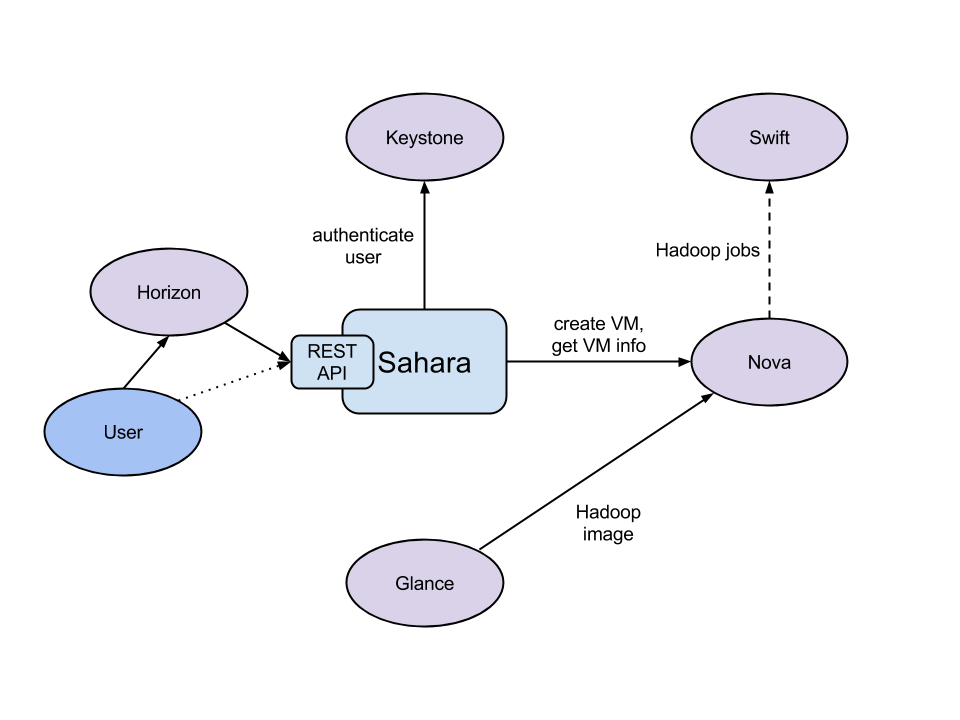
http://docs.openstack.org/developer/sahara/architecture.html

The Sahara architecture consists of several components:
- Auth component - responsible for client authentication & authorization, communicates with Keystone
- DAL - Data Access Layer, persists internal models in DB
- Provisioning Engine - component responsible for communication with Nova, Heat, Cinder and Glance
- Vendor Plugins - pluggable mechanism responsible for configuring and launching Hadoop on provisioned VMs; existing management solutions like Apache Ambari and Cloudera Management Console could be utilized for that matter
- EDP - Elastic Data Processing (EDP) responsible for scheduling and managing Hadoop jobs on clusters provisioned by Sahara
- REST API - exposes Sahara functionality via REST
- Python Sahara Client - similar to other OpenStack components Sahara has its own python client
- Sahara pages - GUI for the Sahara is located on Horizon
http://www.slideshare.net/mirantis/savanna-hadoop-on-openstack
https://www.youtube.com/watch?v=3bI1WjB-5AM
Monday, June 23, 2014
OpenStack Images Project PTL : upcoming updates for Juno
Slides are here
The main focus of Glance was to provide services to store, browse, share, distribute, and manage bootable disk images.
Juno updates of Images : To provide services to store, browse, share, distribute and manage artifacts.
An artifact is strongly-typed versioned data asset, which can include disk image, device layout, machine template, heat template etc.
The main focus of Glance was to provide services to store, browse, share, distribute, and manage bootable disk images.
Juno updates of Images : To provide services to store, browse, share, distribute and manage artifacts.
An artifact is strongly-typed versioned data asset, which can include disk image, device layout, machine template, heat template etc.
Sunday, June 22, 2014
OpenStack : Cinder : Create a non-bootable volume and attach the volume to a running instance
Create a non-bootable volume (8G)
$ cinder create --display-name test-vol1 8
+---------------------+--------------------------------------+
| Property | Value |
+---------------------+--------------------------------------+
| attachments | [] |
| availability_zone | nova |
| bootable | false |
| created_at | 2014-06-22T14:48:17.015580 |
| display_description | None |
| display_name | test-vol1 |
| encrypted | False |
| id | 3339503f-b422-489d-81b4-7b9eb245fe42 |
| metadata | {} |
| size | 8 |
| snapshot_id | None |
| source_volid | None |
| status | creating |
| volume_type | None |
+---------------------+--------------------------------------+
$ cinder show test-vol1
+--------------------------------+--------------------------------------+
| Property | Value |
+--------------------------------+--------------------------------------+
| attachments | [] |
| availability_zone | nova |
| bootable | false |
| created_at | 2014-06-22T14:48:17.000000 |
| display_description | None |
| display_name | test-vol1 |
| encrypted | False |
| id | 3339503f-b422-489d-81b4-7b9eb245fe42 |
| metadata | {} |
| os-vol-host-attr:host | novo |
| os-vol-mig-status-attr:migstat | None |
| os-vol-mig-status-attr:name_id | None |
| os-vol-tenant-attr:tenant_id | d40ee1521270498cbd71cbfdbf54a4ff |
| size | 8 |
| snapshot_id | None |
| source_volid | None |
| status | available |
| volume_type | None |
+--------------------------------+--------------------------------------+
Volume is visible via dashboard

$ nova list
+--------------------------------------+---------------+--------+------------+-------------+--------------------------------+
| ID | Name | Status | Task State | Power State | Networks |
+--------------------------------------+---------------+--------+------------+-------------+--------------------------------+
| affcd01a-9669-4b8f-a89c-5152966d8981 | centos-test01 | ACTIVE | - | Running | private=10.0.0.9, 172.24.4.232 |
| 0c84e296-82d1-487b-bb5f-576b4c73607f | fedora-test01 | ACTIVE | - | Running | private=10.0.0.8, 172.24.4.231 |
| c936ede3-4ec6-4e36-8b1e-3c319badc9c5 | jumphost | ACTIVE | - | Running | private=10.0.0.2, 172.24.4.236 |
+--------------------------------------+---------------+--------+------------+-------------+--------------------------------+
$ cinder list
+--------------------------------------+-----------+--------------+------+-------------+----------+-------------+
| ID | Status | Display Name | Size | Volume Type | Bootable | Attached to |
+--------------------------------------+-----------+--------------+------+-------------+----------+-------------+
| 3339503f-b422-489d-81b4-7b9eb245fe42 | available | test-vol1 | 8 | None | false | |
+--------------------------------------+-----------+--------------+------+-------------+----------+-------------+
Now attach this cinder volume to centos instance
usage: nova volume-attach <server> <volume> [<device>]
$ nova volume-attach affcd01a-9669-4b8f-a89c-5152966d8981 3339503f-b422-489d-81b4-7b9eb245fe42
+----------+--------------------------------------+
| Property | Value |
+----------+--------------------------------------+
| device | /dev/vdb |
| id | 3339503f-b422-489d-81b4-7b9eb245fe42 |
| serverId | affcd01a-9669-4b8f-a89c-5152966d8981 |
| volumeId | 3339503f-b422-489d-81b4-7b9eb245fe42 |
+----------+--------------------------------------+
This volume is showing as in-use and attached to an instance.
$ cinder list
+--------------------------------------+--------+--------------+------+-------------+----------+--------------------------------------+
| ID | Status | Display Name | Size | Volume Type | Bootable | Attached to |
+--------------------------------------+--------+--------------+------+-------------+----------+--------------------------------------+
| 3339503f-b422-489d-81b4-7b9eb245fe42 | in-use | test-vol1 | 8 | None | false |affcd01a-9669-4b8f-a89c-5152966d8981 |
+--------------------------------------+--------+--------------+------+-------------+----------+--------------------------------------+
SSH into centos instance and check /var/log/messages
Jun 22 12:59:34 host-10-0-0-9 kernel: vdb: unknown partition table
/dev/vdb is ready for use :
[root@centos-test01 ~]# fdisk -l /dev/vdb
Disk /dev/vdb: 8589 MB, 8589934592 bytes
16 heads, 63 sectors/track, 16644 cylinders
Units = cylinders of 1008 * 512 = 516096 bytes
Sector size (logical/physical): 512 bytes / 512 bytes
I/O size (minimum/optimal): 512 bytes / 512 bytes
Disk identifier: 0x00000000
Rackspace also provided a good tutorial page for this feature. Link
# mkfs.ext3 /dev/vdb
mke2fs 1.41.12 (17-May-2010)
Filesystem label=
OS type: Linux
Block size=4096 (log=2)
Fragment size=4096 (log=2)
Stride=0 blocks, Stripe width=0 blocks
524288 inodes, 2097152 blocks
104857 blocks (5.00%) reserved for the super user
First data block=0
Maximum filesystem blocks=2147483648
64 block groups
32768 blocks per group, 32768 fragments per group
8192 inodes per group
Superblock backups stored on blocks:
32768, 98304, 163840, 229376, 294912, 819200, 884736, 1605632
Writing inode tables: done
Creating journal (32768 blocks): done
Writing superblocks and filesystem accounting information: done
This filesystem will be automatically checked every 38 mounts or
180 days, whichever comes first. Use tune2fs -c or -i to override.
# mkdir /test01
# vi /etc/fstab
/dev/vdb /test01 ext3 defaults 0 0
# mount /test01
Thursday, June 19, 2014
Prepare CentOS image for OpenStack Image Service
Please also refer to here
Download CentOS install ISO file from http://wiki.centos.org/Download
Verify that the libvirt "default" network is active
In my case, it is not active
# virsh net-list
Name State Autostart Persistent
--------------------------------------------------
libvirt has an example default network XML file under /usr/share/libvirt/networks
# cat /usr/share/libvirt/networks/default.xml
<network>
<name>default</name>
<bridge name="virbr0" />
<forward/>
<ip address="192.168.122.1" netmask="255.255.255.0">
<dhcp>
<range start="192.168.122.2" end="192.168.122.254" />
</dhcp>
</ip>
</network>
According to http://wiki.libvirt.org/page/Networking , we can use the following steps to create "default" network :
# virsh net-define /usr/share/libvirt/networks/default.xml
Network default defined from /usr/share/libvirt/networks/default.xml
After running the above command, the following file is created :
# ls -al /etc/libvirt/qemu/networks/default.xml
-rw-------. 1 root root 579 Jun 19 22:51 /etc/libvirt/qemu/networks/default.xml
[root@novo networks]# cat default.xml
<!--
WARNING: THIS IS AN AUTO-GENERATED FILE. CHANGES TO IT ARE LIKELY TO BE
OVERWRITTEN AND LOST. Changes to this xml configuration should be made using:
virsh net-edit default
or other application using the libvirt API.
-->
<network>
<name>default</name>
<uuid>a459e540-d37d-cfb4-99ad-1c846144ac0d</uuid>
<forward mode='nat'/>
<bridge name='virbr0' stp='on' delay='0' />
<mac address='52:54:00:28:C3:B5'/>
<ip address='192.168.122.1' netmask='255.255.255.0'>
<dhcp>
<range start='192.168.122.2' end='192.168.122.254' />
</dhcp>
</ip>
</network>
# virsh net-start default
Network default started
# brctl show
bridge name bridge id STP enabled interfaces
pan0 8000.000000000000 no
qbr24110dfe-84 8000.f21061f22ed8 no qvb24110dfe-84
tap24110dfe-84
qbr426f579f-55 8000.d6804b3332d3 no qvb426f579f-55
tap426f579f-55
virbr0 8000.52540028c3b5 yes virbr0-nic
virbr0 is the bridge for default network
Now default network is active
# virsh net-list
Name State Autostart Persistent
--------------------------------------------------
default active no yes
# qemu-img create -f qcow2 /tmp/centos-6.5.qcow2 10G
Formatting '/tmp/centos-6.5.qcow2', fmt=qcow2 size=10737418240 encryption=off cluster_size=65536
# virt-install --virt-type kvm --name centos-6.5 --ram 1024 --cdrom=/tmp/CentOS-6.5-x86_64-netinstall.iso --disk /tmp/centos-6.5.qcow2,format=qcow2 --network network=default --graphics vnc,listen=0.0.0.0 --noautoconsole --os-type=linux --os-variant=rhel6
Starting install...
Creating domain... | 0 B 00:00
Domain installation still in progress. You can reconnect to
the console to complete the installation process.
Now continue installation on virt-manager
* select IPv4 DHCP
* select URL

Hostname : localhost.localdomain
* select basic server
After installation is done, reject CDROM by running
# virsh attach-disk --type cdrom --mode readonly centos-6.5 "" hdc
Disk attached successfully
# virsh dumpxml centos-6.5 (before and after diff )
< <disk type='file' device='cdrom'>
---
> <disk type='block' device='cdrom'>
32,33c32
< <source file='/tmp/CentOS-6.5-x86_64-netinstall.iso'/>
< <target dev='hdc' bus='ide'/>
---
> <target dev='hdc' bus='ide' tray='open'/>
Now restart
# virsh destroy centos-6.5
Domain centos-6.5 destroyed
# virsh start centos-6.5
Domain centos-6.5 started
The cloud-init package will automatically fetch the public key from the metadata server and place the key in an account. We continue to install the package.
After server is back, login into the server as root.
# rpm -Uvh http://download.fedoraproject.org/pub/epel/6/x86_64/epel-release-6-8.noarch.rpm
Retrieving http://download.fedoraproject.org/pub/epel/6/x86_64/epel-release-6-8.noarch.rpm
warning: /var/tmp/rpm-tmp.ih3yas: Header V3 RSA/SHA256 Signature, key ID 0608b895: NOKEY
Preparing... ########################################### [100%]
1:epel-release ########################################### [100%]
# yum install cloud-init
After installed, vi /etc/cloud/cloud.cfg
remove the following lines :
default_user:
name: cloud-user
Instead, add the following lines : (centos user will be created when OpenStack starts this image, we do not have to create this user manually)
default_user:
name: centos
lock_passwd: true
gecos: Centos Cloud User
groups: [wheel, adm]
sudo: ["ALL=(ALL) NOPASSWD:ALL"]
shell: /bin/bash
Disable the zeroconf route
In order for the instance to access the metadata service, disable the default zeroconf route:
# echo "NOZEROCONF=yes" >> /etc/sysconfig/network
Configure console
vi /boot/grub/grub.conf
add console=ttyS0,115200n8 to the line that begins with kernel
kernel /vmlinuz-2.6.32-431.el6.x86_64 ro
root=/dev/mapper/VolGroup-lv_root rd_NO_LUKS LANG=en_US.UTF-8 rd_NO_MD rd_LVM_LV=VolGroup/lv_swap SYSFONT=latar
cyrheb-sun16 crashkernel=auto rd_LVM_LV=VolGroup/lv_root KEYBOARDTYPE=pc KEYTABLE=us
console=ttyS0,115200n8 rd_NO_DM rhgb quiet
Shutdown the instance
# /sbin/shutdown -h now
Clean up
There is a utility called virt-sysprep, that performs various cleanup tasks such as removing the MAC address references. It will clean up a virtual machine image in place
# virt-sysprep -d centos-6.5
Examining the guest ...
Performing "yum-uuid" ...
Performing "utmp" ...
Performing "udev-persistent-net" ...
Performing "sssd-db-log" ...
Performing "ssh-userdir" ...
Performing "ssh-hostkeys" ...
Performing "smolt-uuid" ...
Performing "script" ...
Performing "samba-db-log" ...
Performing "rpm-db" ...
Performing "rhn-systemid" ...
Performing "random-seed" ...
Performing "puppet-data-log" ...
Performing "pam-data" ...
Performing "package-manager-cache" ...
Performing "pacct-log" ...
Performing "net-hwaddr" ...
Performing "net-hostname" ...
Performing "mail-spool" ...
Performing "machine-id" ...
Performing "logfiles" ...
Performing "hostname" ...
Performing "firstboot" ...
Performing "dovecot-data" ...
Performing "dhcp-server-state" ...
Performing "dhcp-client-state" ...
Performing "cron-spool" ...
Performing "crash-data" ...
Performing "blkid-tab" ...
Performing "bash-history" ...
Performing "abrt-data" ...
Performing "lvm-uuids" ...
# virsh undefine centos-6.5
Domain centos-6.5 has been undefined
Now /tmp/centos-6.5.qcow2 is ready for uploading to the OpenStack Image Service.


After this image is uploaded to OpenStack and then we can start an instance.

Now try to connect to this instance.
$ ssh centos@172.24.4.232
The authenticity of host '172.24.4.232 (172.24.4.232)' can't be established.
RSA key fingerprint is b5:4a:5c:c8:9e:e9:63:19:65:b0:80:6c:ab:be:20:08.
Are you sure you want to continue connecting (yes/no)? yes
Warning: Permanently added '172.24.4.232' (RSA) to the list of known hosts.
[centos@centos-test01 ~]$
Download CentOS install ISO file from http://wiki.centos.org/Download
Verify that the libvirt "default" network is active
In my case, it is not active
# virsh net-list
Name State Autostart Persistent
--------------------------------------------------
libvirt has an example default network XML file under /usr/share/libvirt/networks
# cat /usr/share/libvirt/networks/default.xml
<network>
<name>default</name>
<bridge name="virbr0" />
<forward/>
<ip address="192.168.122.1" netmask="255.255.255.0">
<dhcp>
<range start="192.168.122.2" end="192.168.122.254" />
</dhcp>
</ip>
</network>
According to http://wiki.libvirt.org/page/Networking , we can use the following steps to create "default" network :
# virsh net-define /usr/share/libvirt/networks/default.xml
Network default defined from /usr/share/libvirt/networks/default.xml
After running the above command, the following file is created :
# ls -al /etc/libvirt/qemu/networks/default.xml
-rw-------. 1 root root 579 Jun 19 22:51 /etc/libvirt/qemu/networks/default.xml
[root@novo networks]# cat default.xml
<!--
WARNING: THIS IS AN AUTO-GENERATED FILE. CHANGES TO IT ARE LIKELY TO BE
OVERWRITTEN AND LOST. Changes to this xml configuration should be made using:
virsh net-edit default
or other application using the libvirt API.
-->
<network>
<name>default</name>
<uuid>a459e540-d37d-cfb4-99ad-1c846144ac0d</uuid>
<forward mode='nat'/>
<bridge name='virbr0' stp='on' delay='0' />
<mac address='52:54:00:28:C3:B5'/>
<ip address='192.168.122.1' netmask='255.255.255.0'>
<dhcp>
<range start='192.168.122.2' end='192.168.122.254' />
</dhcp>
</ip>
</network>
# virsh net-start default
Network default started
# brctl show
bridge name bridge id STP enabled interfaces
pan0 8000.000000000000 no
qbr24110dfe-84 8000.f21061f22ed8 no qvb24110dfe-84
tap24110dfe-84
qbr426f579f-55 8000.d6804b3332d3 no qvb426f579f-55
tap426f579f-55
virbr0 8000.52540028c3b5 yes virbr0-nic
virbr0 is the bridge for default network
Now default network is active
# virsh net-list
Name State Autostart Persistent
--------------------------------------------------
default active no yes
# qemu-img create -f qcow2 /tmp/centos-6.5.qcow2 10G
Formatting '/tmp/centos-6.5.qcow2', fmt=qcow2 size=10737418240 encryption=off cluster_size=65536
# virt-install --virt-type kvm --name centos-6.5 --ram 1024 --cdrom=/tmp/CentOS-6.5-x86_64-netinstall.iso --disk /tmp/centos-6.5.qcow2,format=qcow2 --network network=default --graphics vnc,listen=0.0.0.0 --noautoconsole --os-type=linux --os-variant=rhel6
Starting install...
Creating domain... | 0 B 00:00
Domain installation still in progress. You can reconnect to
the console to complete the installation process.
Now continue installation on virt-manager
* select IPv4 DHCP
* select URL
Hostname : localhost.localdomain
* select basic server
After installation is done, reject CDROM by running
# virsh attach-disk --type cdrom --mode readonly centos-6.5 "" hdc
Disk attached successfully
# virsh dumpxml centos-6.5 (before and after diff )
< <disk type='file' device='cdrom'>
---
> <disk type='block' device='cdrom'>
32,33c32
< <source file='/tmp/CentOS-6.5-x86_64-netinstall.iso'/>
< <target dev='hdc' bus='ide'/>
---
> <target dev='hdc' bus='ide' tray='open'/>
Now restart
# virsh destroy centos-6.5
Domain centos-6.5 destroyed
# virsh start centos-6.5
Domain centos-6.5 started
The cloud-init package will automatically fetch the public key from the metadata server and place the key in an account. We continue to install the package.
After server is back, login into the server as root.
# rpm -Uvh http://download.fedoraproject.org/pub/epel/6/x86_64/epel-release-6-8.noarch.rpm
Retrieving http://download.fedoraproject.org/pub/epel/6/x86_64/epel-release-6-8.noarch.rpm
warning: /var/tmp/rpm-tmp.ih3yas: Header V3 RSA/SHA256 Signature, key ID 0608b895: NOKEY
Preparing... ########################################### [100%]
1:epel-release ########################################### [100%]
# yum install cloud-init
After installed, vi /etc/cloud/cloud.cfg
remove the following lines :
default_user:
name: cloud-user
Instead, add the following lines : (centos user will be created when OpenStack starts this image, we do not have to create this user manually)
default_user:
name: centos
lock_passwd: true
gecos: Centos Cloud User
groups: [wheel, adm]
sudo: ["ALL=(ALL) NOPASSWD:ALL"]
shell: /bin/bash
Disable the zeroconf route
In order for the instance to access the metadata service, disable the default zeroconf route:
# echo "NOZEROCONF=yes" >> /etc/sysconfig/network
Configure console
vi /boot/grub/grub.conf
add console=ttyS0,115200n8 to the line that begins with kernel
kernel /vmlinuz-2.6.32-431.el6.x86_64 ro
root=/dev/mapper/VolGroup-lv_root rd_NO_LUKS LANG=en_US.UTF-8 rd_NO_MD rd_LVM_LV=VolGroup/lv_swap SYSFONT=latar
cyrheb-sun16 crashkernel=auto rd_LVM_LV=VolGroup/lv_root KEYBOARDTYPE=pc KEYTABLE=us
console=ttyS0,115200n8 rd_NO_DM rhgb quiet
Shutdown the instance
# /sbin/shutdown -h now
Clean up
There is a utility called virt-sysprep, that performs various cleanup tasks such as removing the MAC address references. It will clean up a virtual machine image in place
# virt-sysprep -d centos-6.5
Examining the guest ...
Performing "yum-uuid" ...
Performing "utmp" ...
Performing "udev-persistent-net" ...
Performing "sssd-db-log" ...
Performing "ssh-userdir" ...
Performing "ssh-hostkeys" ...
Performing "smolt-uuid" ...
Performing "script" ...
Performing "samba-db-log" ...
Performing "rpm-db" ...
Performing "rhn-systemid" ...
Performing "random-seed" ...
Performing "puppet-data-log" ...
Performing "pam-data" ...
Performing "package-manager-cache" ...
Performing "pacct-log" ...
Performing "net-hwaddr" ...
Performing "net-hostname" ...
Performing "mail-spool" ...
Performing "machine-id" ...
Performing "logfiles" ...
Performing "hostname" ...
Performing "firstboot" ...
Performing "dovecot-data" ...
Performing "dhcp-server-state" ...
Performing "dhcp-client-state" ...
Performing "cron-spool" ...
Performing "crash-data" ...
Performing "blkid-tab" ...
Performing "bash-history" ...
Performing "abrt-data" ...
Performing "lvm-uuids" ...
# virsh undefine centos-6.5
Domain centos-6.5 has been undefined
Now /tmp/centos-6.5.qcow2 is ready for uploading to the OpenStack Image Service.
After this image is uploaded to OpenStack and then we can start an instance.
Now try to connect to this instance.
$ ssh centos@172.24.4.232
The authenticity of host '172.24.4.232 (172.24.4.232)' can't be established.
RSA key fingerprint is b5:4a:5c:c8:9e:e9:63:19:65:b0:80:6c:ab:be:20:08.
Are you sure you want to continue connecting (yes/no)? yes
Warning: Permanently added '172.24.4.232' (RSA) to the list of known hosts.
[centos@centos-test01 ~]$
Subscribe to:
Posts (Atom)